
QuickBend: Conduit Bending
Bret H. HardmanProductivity
4.3199.00 Reviews
- Version
- 5.1.3
- Installs
- 50.00K
- Age Rating
- Everyone
Screenshots
Our Review of QuickBend: Conduit Bending
 Analysis by Appyee
Conduit bends are easy to get wrong in a way that costs more than a few seconds: a small mistake can mean rechecking a measurement, making another bend, or wasting material. That is the recurring job-site frustration I want a bending calculator to reduce. QuickBend: Conduit Bending is built for that narrow, practical task, and I see its value less as a replacement for experience than as a quick calculation aid when I need to plan a bend without stopping to work it all out from memory.
A pocket calculation aid, not a substitute for the bender
QuickBend is a paid productivity app from developer Bret H. Hardman. It costs $6.99, is rated for Everyone, and its current version is 5.1.2. The app has a 4.2 average from around 380 ratings and has been installed over 50,000 times. Those figures suggest it has found a real audience among people who bend conduit, though they do not tell me whether it fits every shop’s habits or every user’s preferred workflow.
The key question before paying is whether you bend often enough for a dedicated calculator to earn a place on your phone. If conduit work is occasional, a paper reference or a calculation method you already trust may be enough. If you regularly move among different bend types and want to reduce mental arithmetic, a purpose-built tool can be more convenient than searching through notes or a general calculator. I would treat its answers as a planning aid and still check the setup against the actual conduit, bender, and job requirements before making a cut or bend.
Where it earns its keep during a job
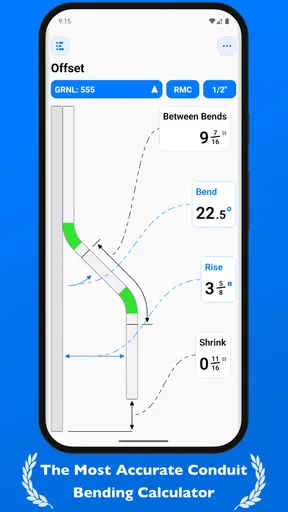
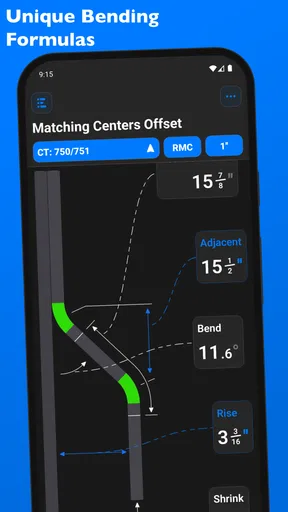
A useful everyday scenario is laying out an offset around an obstruction. Instead of trying to remember the relevant steps while measuring on site, I can use the app to work through the calculation, then mark the conduit and make the bend with the tools in my hands. That division of labor matters: the phone helps with the numbers, but careful measurement, alignment, and physical technique still decide whether the finished run fits.
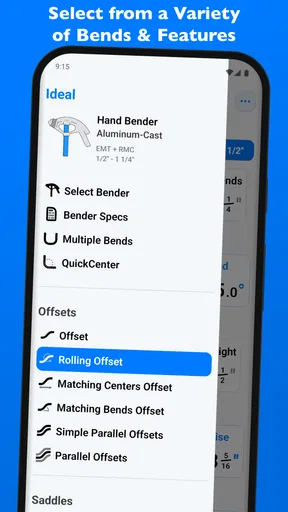
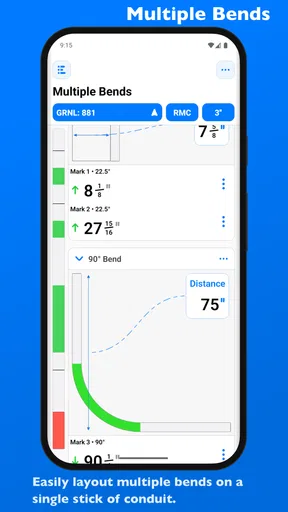
QuickBend is also useful when a job calls for more than one kind of bend. The app covers EMT, rigid, and PVC, as well as offsets, saddles, and 90-degree bends. Having those choices gathered in one place is more practical than keeping separate scraps of notes for each situation. The benefit is not that every bend suddenly becomes effortless; it is that I spend less time hunting for a method and more time checking whether I have selected the right material and bend type for the task.
One trade-off worth keeping in mind is that a calculator cannot compensate for incorrect inputs. Before trusting a result, I would confirm the measurements I entered and make sure the selected conduit type and bend match the job. That brief pause is especially valuable when working quickly or switching between materials. It is a simple habit that helps prevent a neat-looking answer from being applied to the wrong piece of conduit.
Getting Started with QuickBend
First things first, downloading and setting up QuickBend: Conduit Bending is a breeze. Available on both Android and iOS, it’s just a quick tap away in the app store. Once installed, you’re greeted with a clean and intuitive interface that doesn’t overwhelm you with too many options at once. I love how it feels like the app was designed with electricians in mind, keeping things simple yet effective.
Features That Stand Out
What I found most impressive were the array of features packed into this app. Let’s break down a few:
- Conduit Types: You can select from a variety of conduit types like EMT, Rigid, and PVC. This flexibility means you’re not stuck with one standard, which is super handy.
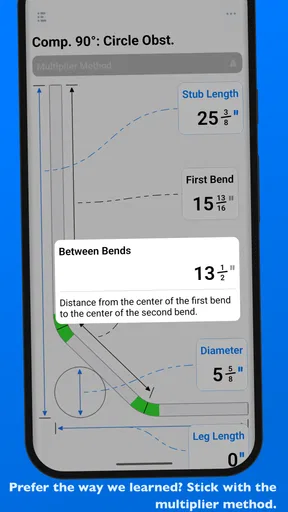
- Bend Types: The app supports multiple bend types such as offsets, saddles, and 90-degree bends. It’s like having a bending cheat sheet in your pocket.
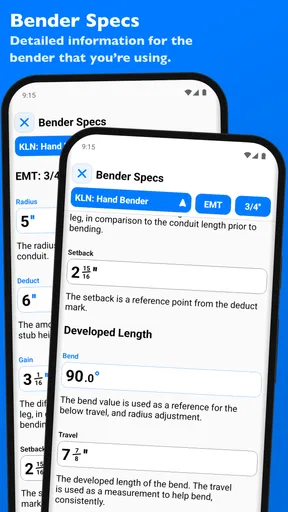
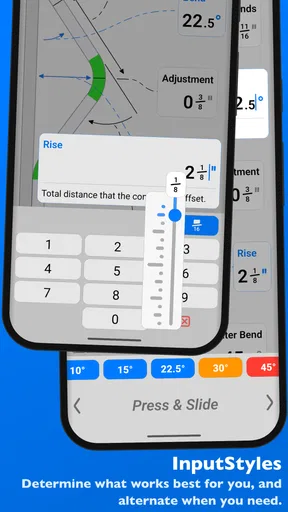
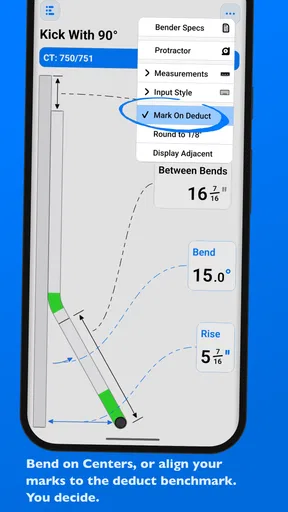
- Customization: You can input your own measurements and preferences, making it a truly personalized tool.
- Real-Time Calculation: The app calculates bends in real-time, which means less guesswork and more precision. This is where it really shines, saving you time and reducing waste.
Ease of Use
One of the standout aspects of QuickBend is how user-friendly it is. The app doesn’t require a steep learning curve. The developers have clearly put thought into making it accessible for everyone, regardless of experience level. The step-by-step guide provided within the app ensures that even if it’s your first time using such a tool, you won’t feel lost.
Another thing worth mentioning is the app’s responsiveness. It worked smoothly on my device without any lags or crashes, which is crucial when you’re out in the field and need something reliable.
Practical Applications
Now, you might be wondering, "Is this app really necessary?" Well, if you're in a profession where precision is key, then absolutely. Picture this: you're on a job site, and you need to make a perfectly precise bend, but you don't have your guidebook. That's where QuickBend swoops in to save the day.
For those who work in environments where time and accuracy are critical, this app can be a lifesaver. It minimizes errors and maximizes efficiency, which in my book, is a win-win.
Choosing it over familiar alternatives
Compared with a general calculator, QuickBend is useful when I want a conduit-specific workflow rather than having to remember which formula applies and enter each step myself. A printed reference can be dependable and easy to glance at, but it may be less convenient when I need to switch among bend types or adapt a calculation to my own measurements. Neither alternative is automatically worse: a familiar paper chart may be quicker for a well-practiced task, while the app makes more sense when I need a compact reference and calculation aid in one place.
I would not recommend relying on any phone calculator as the only check for a demanding installation. The app can help organize the calculation, but field conditions, the bender being used, and the accuracy of the measurements still matter. I find the strongest workflow is to calculate, inspect the result, mark the conduit carefully, and verify the physical setup before committing to a bend. That extra check is not wasted time; it is a sensible safeguard against turning a mistaken input into wasted material.
Who will benefit—and who may not
For apprentices, the app can make bend calculations easier to follow while they build familiarity with the process. For experienced electricians, the appeal is different: it can shorten the pause between recognizing a bend and working out its layout. It is also a sensible fit for someone who handles several conduit types and wants a single on-phone reference instead of scattered notes. In each case, the app works best as a companion to practical knowledge, not a shortcut around learning why a bend is laid out a certain way.
If you only bend conduit now and then, already have a reliable reference at hand, or prefer to do every calculation manually, the $6.99 purchase may not make sense. The same goes for anyone expecting an app to choose the right approach without careful input or to take over the physical work. A free general calculator plus a method you know well can be the better option for occasional jobs. The paid app has a clearer case when repeated use saves enough time and reduces enough lookup friction to justify keeping it available.
A careful routine makes the speed worthwhile
One practical habit I recommend is to treat each calculation as a small checklist: identify the conduit, choose the bend, enter the measurements deliberately, and pause to confirm the displayed result before marking. That sequence may sound obvious, but it is particularly helpful when a job changes mid-task and you are moving from one material or bend type to another. It uses the app’s flexibility without letting speed encourage an unchecked choice.
Another useful trade-off is deciding when not to open the app. For a bend I make repeatedly and know by heart, reaching for the phone may add friction rather than remove it. For an unusual layout, a less familiar bend, or a measurement that deserves a second look, the calculator is more valuable. The best time-saving tool is not necessarily the one used for every step; it is the one I can bring in at the points where uncertainty or repeated arithmetic would otherwise slow me down.
Final Thoughts
As someone who appreciates a well-designed tool, I can confidently say that QuickBend: Conduit Bending is worth checking out. It’s practical, reliable, and incredibly easy to use. While it may not replace your traditional tools, it certainly enhances your toolkit, making it a must-have for pros and novices alike.
So, if you’re looking to make conduit bending a bit less of a headache and a lot more efficient, give QuickBend a try. You might just find it becomes your go-to app for all things bending!
Verdict
Strengths of QuickBend: Conduit Bending
- Intuitive interface for easy navigation.
- Supports multiple bending calculations.
- Accurate and precise measurement tools.
- Time-saving with quick calculations.
- Comprehensive tutorials for beginners.
Limitations of QuickBend: Conduit Bending
- Limited free features, requires upgrade.
- Occasional lag on older devices.
- No offline mode available.
- Requires account registration to save data.
- Ads can be intrusive in free version.
Similar Picks in This Category
View All
Google Calendar
Google LLC4.6

Google Drive
Google LLC4.3

Google Assistant
Google LLC3.9

Microsoft OneDrive
Microsoft Corporation4.6

Samsung Calendar
Samsung Electronics Co., Ltd.4.1

Microsoft OneNote: Save Notes
Microsoft Corporation4.6
Frequently Asked Questions
What is QuickBend and how does it work?
QuickBend is a powerful app designed for electricians and contractors to simplify the process of conduit bending. It provides precise measurements and calculations for different types of bends, ensuring accuracy and efficiency on the job. Users can input their specific requirements and the app delivers detailed instructions, making complex bends easier to execute.
Is QuickBend suitable for beginners?
Yes, QuickBend is user-friendly and caters to both beginners and experienced professionals. The app offers a straightforward interface, along with tutorials and guides to help users understand the basics of conduit bending. Its step-by-step instructions make it easy for newcomers to learn and apply bending techniques effectively.
What devices are compatible with QuickBend?
QuickBend is available for both Android and iOS devices. It is compatible with most modern smartphones and tablets, ensuring users can access its features on the go. Regular updates keep the app optimized for the latest operating systems, providing a seamless experience across platforms.
Does QuickBend require an internet connection?
No, QuickBend can operate offline, making it convenient for use in locations where internet access is limited or unavailable. All calculations and instructions are processed within the app, ensuring that users can rely on QuickBend even on remote job sites without connectivity.
Are there any in-app purchases or subscriptions in QuickBend?
QuickBend offers a one-time purchase model with no hidden fees or subscriptions. Once purchased, users gain full access to all features and updates. This ensures a straightforward experience without the worry of recurring costs, making it a cost-effective tool for professionals.
